
Act-On Tracking Beacon: Technical Audit

Act-On Tracking Beacon: Technical Audit
Download a PDF of all the information in this article here.
What exactly is the Act-On Beacon? What does it do?

How Can The Beacon Help?
1. Marketing Target Definition
Using data collected from the Act-On Beacon, marketers are able to target messaging based on specific tracked behaviors. Through Act-On’s native segmentation, marketing is able to create audience segmentation based on the number of page visits in a time range, or visits to specific pages on the website.
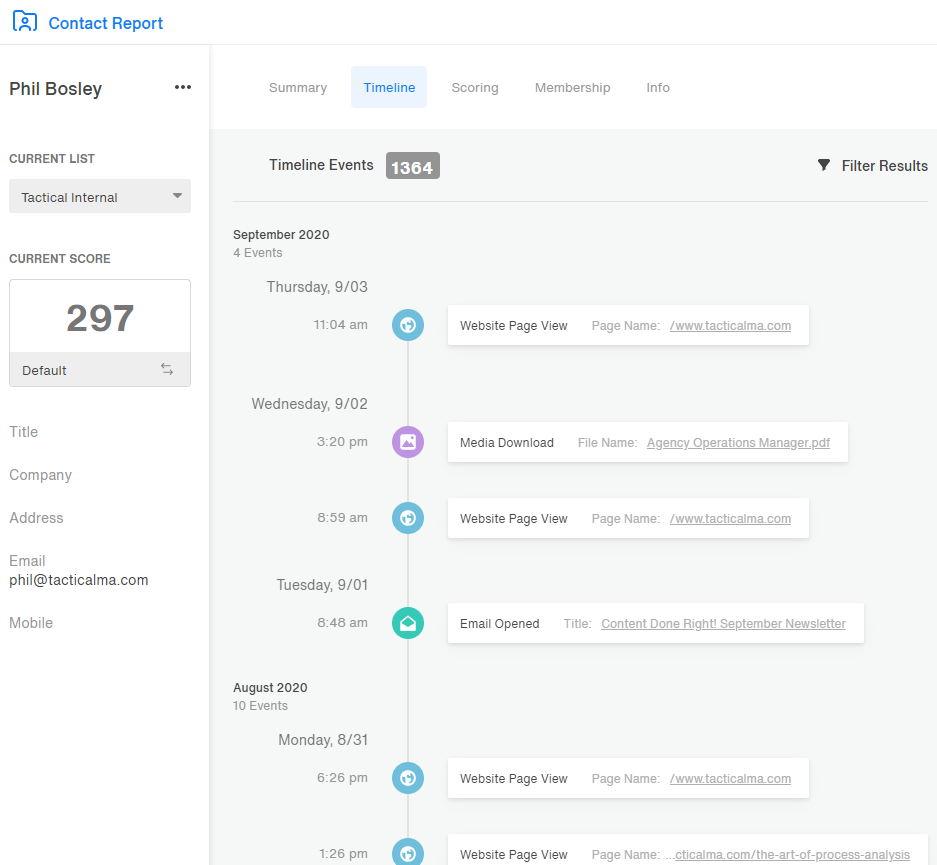
For example, Tactical MA could target users visiting this blog post, then our About Us page, and then our Contact Us page who don’t submit our Contact Us form. I could then nurture these persons with Automated Programs in Act-On.
2. Act-On Lead Scoring
Once a person is being tracked by the Act-On Beacon, the next step in the process is the “Known Visitor Conversion”. A person becomes known to Act-On when they click on an Act-On email or submit an Act-On form. Act-On associates the cookie ID it has been tracking to the individual’s email address which enables Lead Scoring for that individual. Because all tracked behavior is now associated with the person’s email address, any list that person is in now has a universal Lead Score it can reference based on your configuration. Additionally, if you are using an integrated CRM like Salesforce, Microsoft Dynamics, or SugarCRM, these lead scores and behaviors are visible directly in CRM.
3. Sales Enablement using Act-On
I am text block.When you pick up the phone to make a sale you want to be confident the person on the other end wants to hear what you have to say. There is nothing worse than guessing wrong and being lit up because of it. The Beacon provides Sales with direct insight into the prospect’s activities, research, and interest areas before they initiate any outreach. When combined with effective views, this also provides enhanced prioritization based on Lead Scoring or specific indicators. The typical impact is a ~50% increase in sales productivity.
4. Create alerts and triggers
Using the Beacon in concert with alerts and automated programs transforms Act-On marketing automation into a control panel for insight and awareness. The Beacon is the core of audience insights that can be used to configure automated alerts based on page visits, qualification levels, indicators, or specialized follow up. Advanced uses cases for this included monitoring for specific sets of behavior (e.g. alert the assigned Salesforce owner if [email protected] visits our website) or the absence of behavior (e.g. alert customer support if [email protected] has not visited the login page in the last 30 days).
What are the risks?
Performance Risk

The total run time for all events associated with this script is approximately 150 ms. When placed in the footer of the website, it should have no measurable impact on page performance.
Security Risk
The simple script uses common cookie tracking technology. Examples of similar technology include Google Analytics, Facebook, and LinkedIn advertising scripts.
Privacy Risk

While its data collection is limited, consideration should be given to governing and regional authorities.
Where do I configure the Beacon?
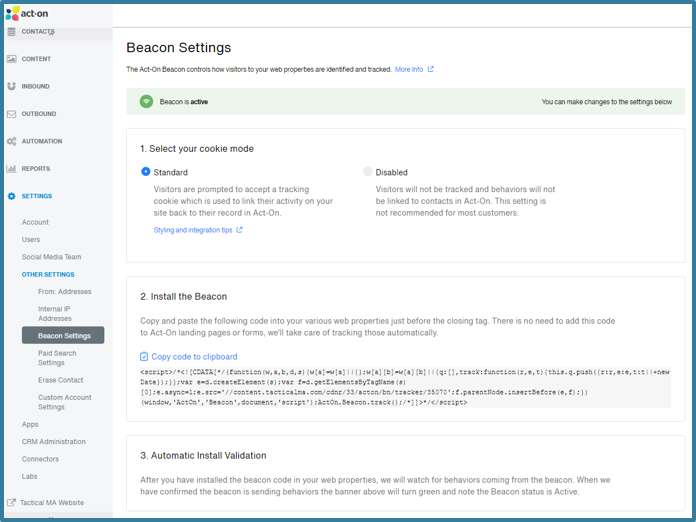
The Act-On Beacon is configured in your Act-On account. Simply navigate to Settings-> Other Settings-> Beacon Settings. Here you will see the current status of the Beacon, as well as your configuration options. Once configured, simply copy the Beacon code to your clipboard and add this to the footer element of the page or site you want to track with the Act-On Beacon. Full Act-On documentation for the Beacon can be found here.
Too Complicated?
The road to good marketing automation begins with a single step. We believe that the Beacon is an essential tool for unlocking all sorts of practical automation. Not sure where to start? Contact us today for a consultation and we can help round out how to get the Beacon set up on your site and feeding you data that you need.
To download a PDF of all of the information presented here, including a flowchart of the Beacon’s technical process, click below.
Put the method on paper: the Tactical Marketing Workbook.
The full methodology converted into working sessions - eight phases of fill-in worksheets, exit checklists, and one-week action steps. Print it, work one vertical at a time, and turn the framework into decisions your team has actually made.
Philip Easley-Bosley is the founder of Tactical Marketing and a thirty-year expert marketing consultant. His path to founding the firm ran through sales and marketing leadership, years inside Act-On Software consulting with thousands of clients as Lead Marketing Automation Strategist, and a consistent priority on training and team building that a linear career could not have produced. He sets strategy, owns the architectural calls on every engagement, and writes about marketing operations, automation, and the discipline of building systems that hold up on Monday morning.